ProfExam Creator 10.2.2.495 ships with a new Import from JSON window - a dedicated interface for loading question content from JSON files directly into your exams. Whether you're migrating from another tool, working with AI-generated content, or building questions programmatically, this window gives you a structured, visual way to do it.
How to open it
The window is accessible in three ways:
- Keyboard shortcut Ctrl+Alt+J
- Button in the main toolbar

- File → Import JSON
What the window includes
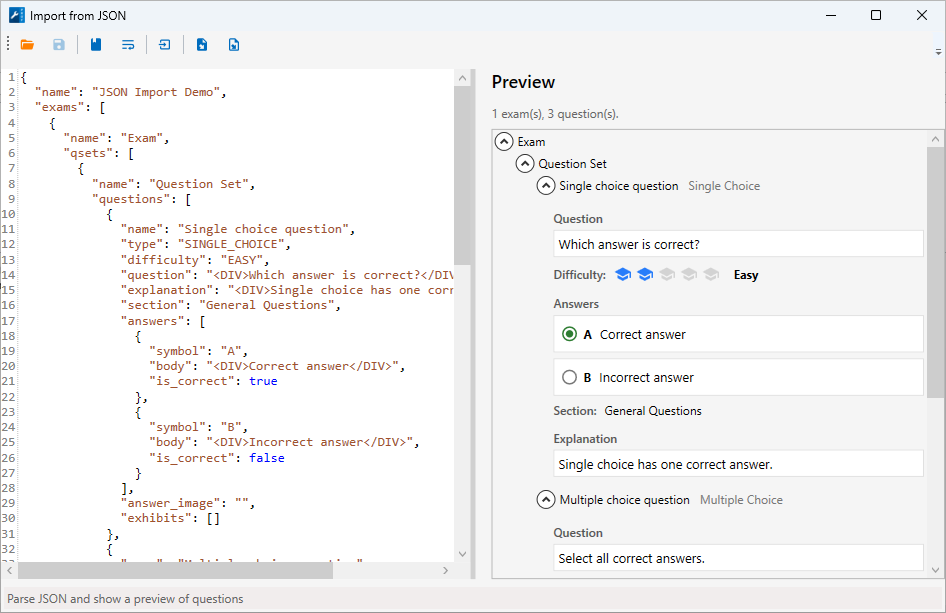
The window is split into two panels. The left side is a full-featured JSON editor with syntax highlighting and a wrap mode toggle. The right side shows a live preview - parse your JSON and immediately see the full exam structure, question types, difficulty levels, and answers before importing anything.
A toolbar across the top gives you quick access to all actions (see the full reference below).
JSON format
The format follows a straightforward hierarchy: a root object holds a list of exams, each exam contains question sets, and each question set contains questions. Question and answer bodies accept HTML text.
Three question types are supported:
- SINGLE_CHOICE - one correct answer. Each answer has a symbol, HTML body, and is_correct flag.
- MULTIPLE_CHOICE - one or more correct answers. Same answer structure as single choice.
- TEXT - free-text answer compared against a list of accepted values. Supports ignore_case and multiple accepted variants.
Each question also supports:
- difficulty - EASY, MODERATE, or HARD
- section - section label for the question
- explanation - HTML explanation shown after answering
- answer_image, exhibits - optional media attachments
Example structure
Not sure about the format? Open the window and click the snippet button - it inserts a complete working example you can edit directly. Here it is for reference (question and answer bodies use HTML text in the real format - simplified here for readability):
{
  "name": "JSON Import Demo",
  "exams": [{
    "name": "Exam",
    "qsets": [{
      "name": "Question Set",
      "questions": [
        {
          "name": "Single choice question",
          "type": "SINGLE_CHOICE",
          "difficulty": "EASY",
          "question": "HTML text",
          "explanation": "HTML text",
          "section": "General Questions",
          "answers": [
            { "symbol": "A", "body": "HTML text", "is_correct": true },
            { "symbol": "B", "body": "HTML text", "is_correct": false }
          ],
          "answer_image": "",
          "exhibits": []
        },
        {
          "name": "Multiple choice question",
          "type": "MULTIPLE_CHOICE",
          "difficulty": "MODERATE",
          "question": "HTML text",
          "explanation": "HTML text",
          "section": "General Questions",
          "answers": [
            { "symbol": "A", "body": "HTML text", "is_correct": true },
            { "symbol": "B", "body": "HTML text", "is_correct": true },
            { "symbol": "C", "body": "HTML text", "is_correct": false }
          ],
          "answer_image": "",
          "exhibits": []
        },
        {
          "name": "Text question",
          "type": "TEXT",
          "difficulty": "HARD",
          "question": "HTML text",
          "explanation": "HTML text",
          "section": "General Questions",
          "ignore_case": true,
          "answers": [
            { "body": "text" },
            { "body": "text" }
          ],
          "answer_image": "",
          "exhibits": []
        }
      ]
    }]
  }]
}
Toolbar reference
| Button | Action |
|---|---|
 |
Open JSON file |
 |
Save JSON file |
 |
Insert example JSON snippet |
 |
Toggle wrap mode in editor |
 |
Parse JSON and generate preview |
 |
Insert into document, replacing current content |
 |
Append to document as a new Question Set |
Update to 10.2.2.495 to get the new window. Download the latest version at profexam.com/download.