We're pleased to introduce a highly requested feature in ProfExam Simulator 10.21.6 that makes exam preparation more efficient and focused.
After completing an exam session, you can now instantly create a new attempt based on:
- All questions
- Correctly answered questions
- Incorrectly answered questions
- Skipped questions
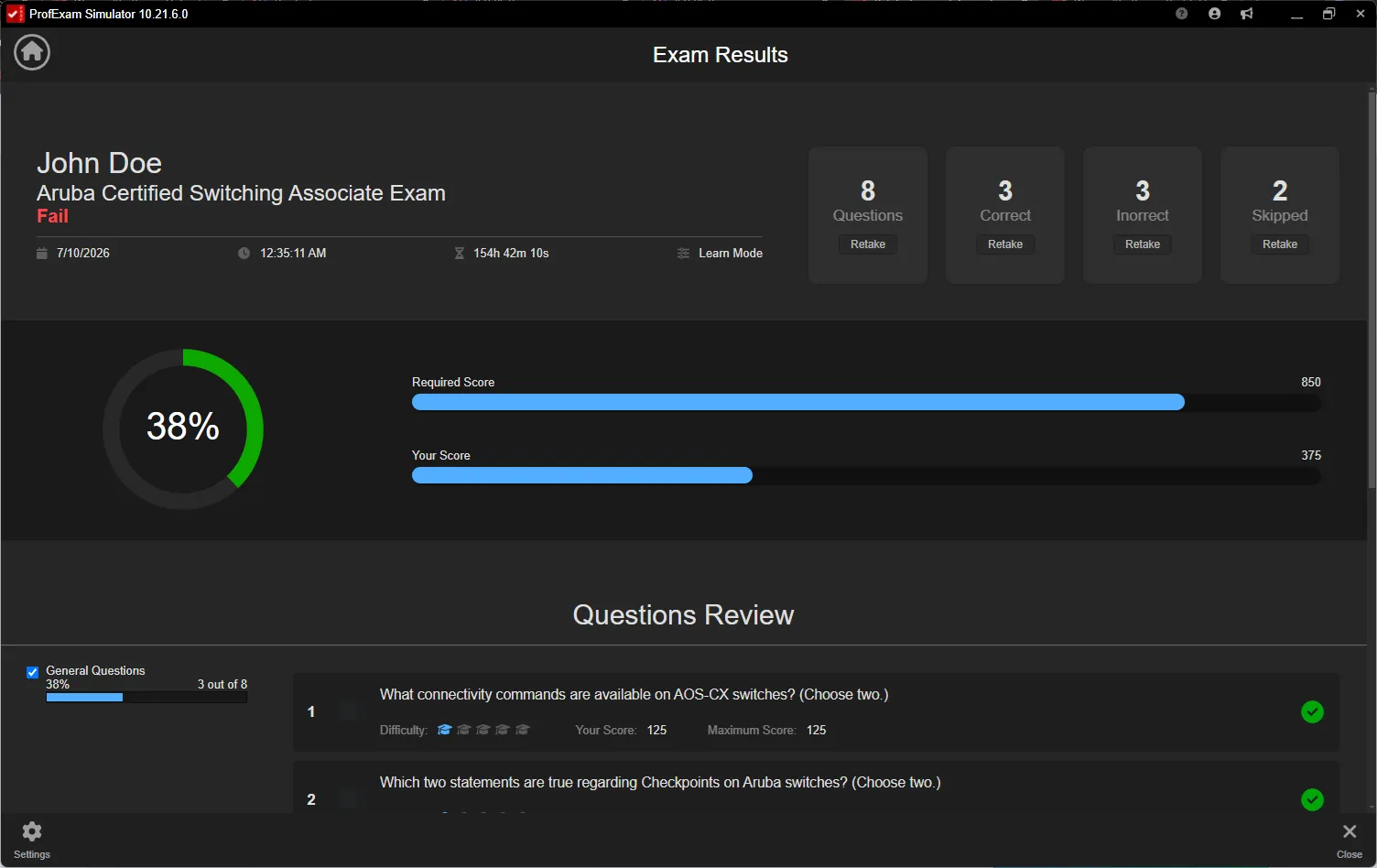
New Retake buttons are now available directly in the Exam Results screen, allowing you to start a new session with a single click.
The newly created session automatically preserves all settings from the original attempt, including:
- Exam Mode or Learn Mode
- Answer visibility settings
- Question behavior and session configuration
For example, if the original session was completed in a learning mode with answer explanations visible, the new session will be created with the same settings. If it was a realistic exam simulation without answer hints, the retake session will follow the same exam conditions.
This feature is especially useful for:
- Focusing on weak areas
- Reviewing incorrect answers
- Reinforcing knowledge through repetition
- Improving certification exam readiness
The new retake options are available now in ProfExam Simulator 10.21.6 for Windows, macOS, and Linux.