In ProfExam Creator, you can create exams not only manually but also automatically by importing JSON files. This feature is especially useful when working with large question banks or generating exams programmatically.
Example: Importing a JSON file in ProfExam Creator
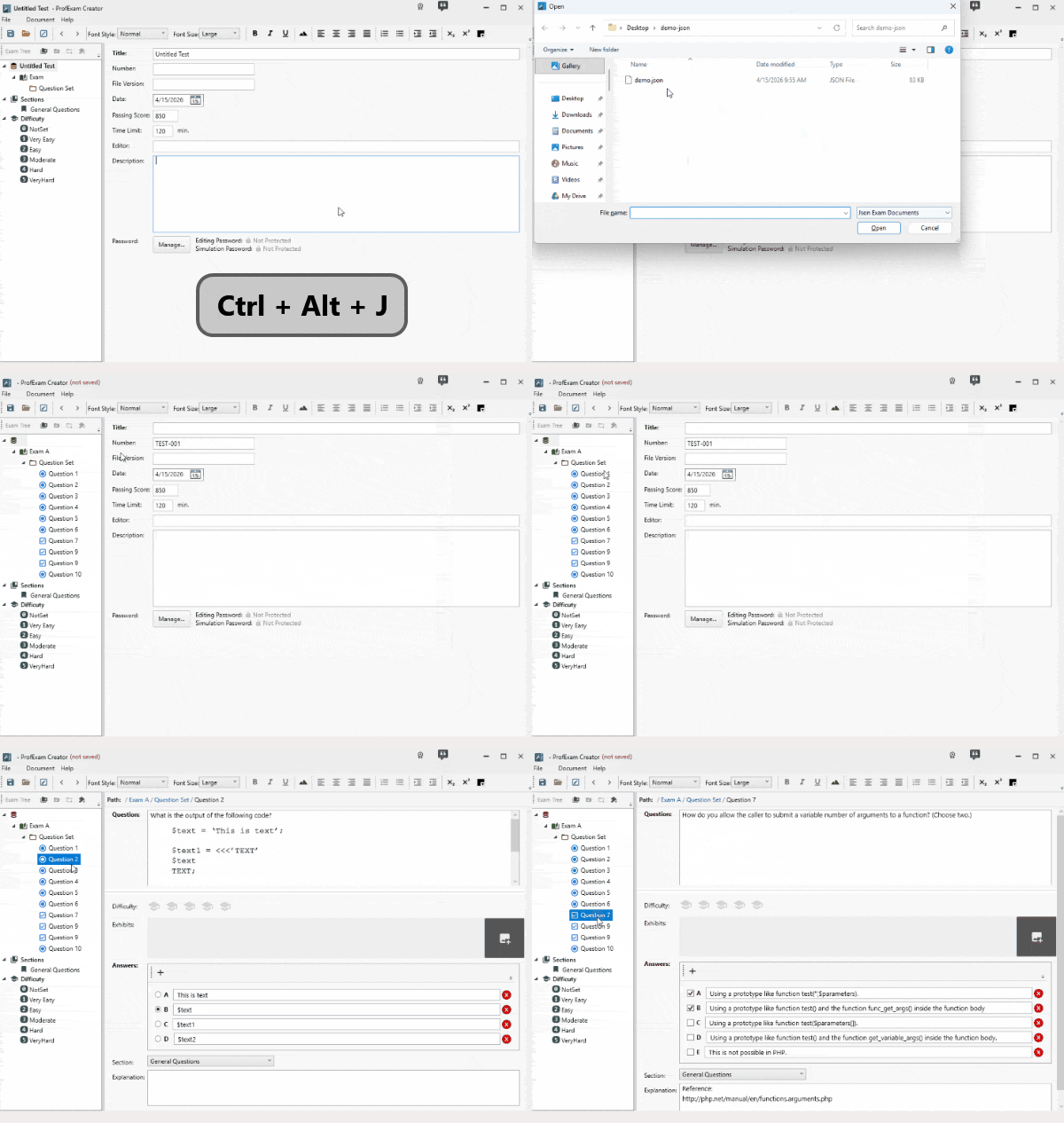
In this guide, you’ll learn how to structure your JSON file and import it into ProfExam Creator.
How to Import JSON
To import a JSON file:
- Press Ctrl + Alt + J
- Select your JSON file
- The exam structure will be created automatically
JSON File Structure
Below is a basic example of a valid JSON structure:
{
  "name": "TEST-001",
  "exams": [
    {
      "name": "Exam A",
      "qsets": [
        {
          "name": "Question Set 1",
          "questions": [
            {
              "name": "Question 1",
              "question": "<div>...</div>",
              "answers": [
                {
                  "symbol": "A",
                  "body": "<div>...</div>"
                }
              ],
              "correctAnswer": "C",
              "explanation": "",
              "type": 1
            }
          ]
        }
      ]
    }
  ]
}
Structure Breakdown
Exam
- name - exam name
- exams - list of exams
Question Set
- name - group name
- questions - list of questions
Question
- name - question name
- question - question text (HTML supported)
- answers - answer options
- correctAnswer - correct answer(s)
- explanation - explanation (optional)
- type - question type
Answer
- symbol - identifier (A, B, C, D...)
- body - answer text (HTML)
Question Types
In ProfExam Creator, you can create up to 10 different question types when building exams manually. The JSON import feature is actively evolving, and support for additional question types will be gradually added in future updates.
Currently, the following question types are supported:
1. Single Answer
Only one correct answer:
"type": 1,
"correctAnswer": "A"
2. Multiple Answer
Multiple correct answers are allowed:
"type": 2,
"correctAnswer": "DE"
Important:
- Do not use separators (like commas)
- Each character must match an answer symbol
Adding Images
You can include images inside questions and answers using HTML.
Use Base64 format:
<img src="data:image/png;base64,...">
- Use correct MIME types (image/png, image/jpeg)
- Base64 string must be complete
- Local file paths are not supported
Important Notes
- JSON must be valid
- File encoding must be UTF-8
- correctAnswer must match answer symbols
- Structure must be strictly followed
When to Use JSON Import
- Generating questions programmatically
- Migrating exams from other systems
- Working with large question databases
Future Improvements
The JSON import feature in ProfExam Creator is actively evolving.
Support for additional question types and extended fields will be added in future updates.
Availability
The JSON import feature is available in ProfExam Creator 10. To learn more about the editor and download the latest version, visit: https://profexam.com/exam-creator